
How to create multiple records from one using Explicit Output
Welcome to our SAS programming blog! Today, we're diving into a powerful and elegant technique that allows you to take a single record from your input data and multiply it into several records in your output. This is done using what SAS calls explicit output, and it's an essential skill for data manipulation tasks.
What is Explicit Output?
In a standard SAS DATA step, SAS reads one record from your input data set, processes it, and writes one corresponding record to your output data set. This is known as implicit output.
Explicit output, on the other hand, gives you direct control over when and how many times an observation is written to the output data set. You achieve this control by adding the OUTPUT statement to your DATA step. Each time SAS encounters an OUTPUT statement in your code, it writes the current contents of the Program Data Vector (PDV) as a new observation to the final data set. This simple statement unlocks the ability to generate multiple records from a single input record, which is incredibly useful for various data restructuring tasks.
A Practical Example: Calculating BMI in Two Different Ways
Let's imagine you have a dataset of student information, SASHELP.CLASS, which includes their height in inches and weight in pounds. Your task is to calculate the Body Mass Index (BMI) for each student. However, you need to calculate it using two different systems:
The Metric System: Weight (kg) / (Height (m))^2
The FPS (Foot-Pound-Second) System: Weight (lbs) / (Height (in))^2
The goal is to have a final dataset where each student has two separate rows—one for each BMI calculation method. This is a perfect scenario for explicit output!
Step 1: Setting Up the DATA Step and Initial Conversions
First, we'll start a DATA step to read from SASHELP.CLASS and create a new dataset called WORK.CLASS. Inside the step, we'll create two new variables, weight_kg and height_m, by converting the original weight and height variables:
/* Create the WORK.CLASS dataset from SASHELP.CLASS */
DATA class;
SET sashelp.class;
/* Convert weight from pounds to kilograms */
weight_kg = weight * 0.454;
/* Convert height from inches to meters */
height_m = height * 0.0254;
RUN;
Note: In the sources, the conversion factor for height was written as 2.54 / 100, which simplifies to 0.0254.
At this point, we've added the converted values, but we still only have one record per student.
Step 2: Calculating BMI and Using Explicit Output
Now, let's add the BMI calculations and the magic OUTPUT statements. We'll calculate the BMI using the metric variables first, and right after that calculation, we'll add an OUTPUT statement. This tells SAS: "Okay, the first record is ready. Write it out now!".
Then, we'll perform the second BMI calculation using the original pound and inch variables. We'll follow that with another OUTPUT statement to create the second record. It is important to use the same variable name (BMI) for both calculations. If you used different names (like BMI_1 and BMI_2), SAS would simply create two new columns instead of two separate rows.
Here is the complete code:
/* Create the WORK.CLASS dataset and generate two rows per student */
DATA class;
SET sashelp.class;
/* 1. Create new variables for metric conversions */
weight_kg = weight * 0.454;
height_m = height * (2.54 / 100);
/* 2. Calculate BMI using the METRIC system */
BMI = weight_kg / (height_m * height_m);
/* Explicitly output the first observation for this student */
OUTPUT;
/* 3. Calculate BMI using the FPS system */
BMI = weight / (height * height);
/* Explicitly output the second observation for this student */
OUTPUT;
RUN;
Note: It's good practice to use parentheses in the denominator to ensure the height is squared before the division occurs, which the source material also points out.
The Result
When you run this code, your new WORK.CLASS dataset will have two rows for every student. For a student named John, it would look something like this:
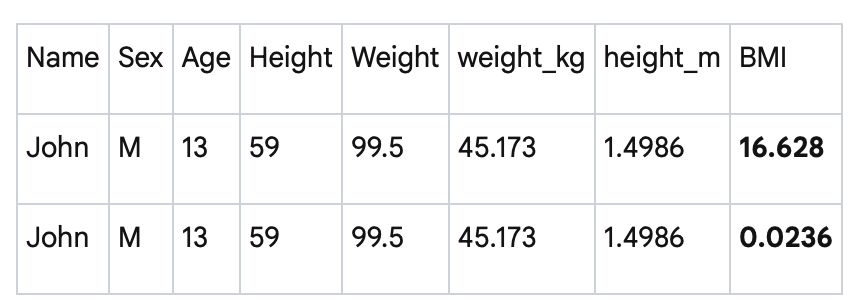
As you can see, all the original and converted variables are identical across John's two records. The only difference is the BMI value, which corresponds to the two different calculation methods. The two OUTPUT statements were responsible for creating these two separate rows from a single input row.
Why This is So Useful
The ability to generate multiple observations from a single input observation is a cornerstone of advanced data structuring in SAS. This technique is not just for creating duplicate calculations; it can be used for a wide range of tasks, such as:
Transposing data from a "wide" format to a "long" format.
Creating separate records for different events or time periods contained within one original record.
Generating iterative data, often in combination with DO loops.
By mastering the explicit OUTPUT statement, you gain a new level of control and flexibility in your SAS programming toolkit, allowing you to shape your data exactly how you need it for reporting and analysis.
Join our vast online community to learn together and accelerate your success